


In 2026, AliExpress uses a single form for both registration and sign-in. You can create an account using an email address, phone number, or a supported third-party service, but the steps differ depending on the method you choose.
Some details are worth checking before completing registration, as they can affect how you use your account later. Verification codes may fail to arrive, registration attempts can run into errors, and new accounts may face security restrictions. Not every issue can be resolved by simply trying again.
This guide explains how to sign up on the AliExpress website and mobile app, troubleshoot common registration problems, and avoid mistakes that could cause issues later. It also covers the key settings to review before placing your first order.
- What You Need to Sign Up for AliExpress
- How to Sign Up on the AliExpress Website
- How to Sign Up in the AliExpress App
- Important Registration Details
- Why You May Have Trouble Signing Up for AliExpress
- Verification Code Not Arriving
- AliExpress Won’t Accept the Verification Code
- Email Address or Phone Number Already in Use
- Registration Form Not Working
- AliExpress Rejects Your Email Address
- New AliExpress Account Blocked
- What to Do After Creating Your AliExpress Account
- Frequently Asked Questions
What You Need to Sign Up for AliExpress
Creating an AliExpress account is free. You can register on the official website or through the mobile app. You must be an adult and have access to an email address, phone number, or supported third-party sign-in service.
- Email address or phone number. You can sign up with either one. Make sure you have access to your email inbox or phone, as AliExpress may send you a verification code. In some cases, you may also be asked for a phone number even if you register using email.
- Google, Apple, or Facebook account. You can also sign up through one of these services without manually entering your email address or phone number. Select the available option and follow the sign-in prompts. The methods offered may vary depending on your device and the version of AliExpress you’re using.
- Password. If AliExpress asks you to create a password, choose a strong, unique one that you don’t use elsewhere. You may not need a separate AliExpress password when signing in with Google or Apple.
You don’t need to provide a shipping address, passport details, or bank card information just to register. You can add your address later and choose a payment method when placing an order. AliExpress may request additional account verification in certain cases.
How to Sign Up on the AliExpress Website
- Go to AliExpress.com. Open the Account menu in the top-right corner and select Register/Sign in. The same form is used for both new registrations and existing accounts.
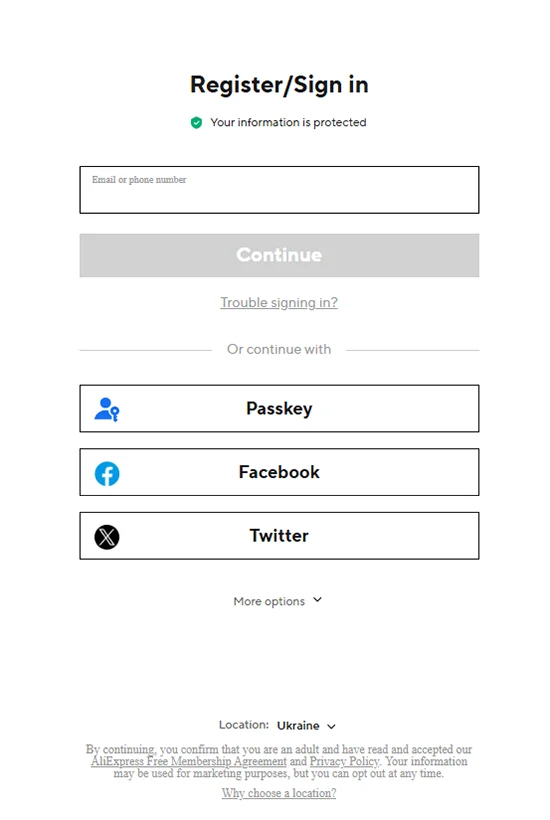
- Check your location. At the bottom of the form, find the country listed next to Location. Make sure it matches the country you’re shopping from. For example, if you’re shopping from the US, select United States. AliExpress uses this information to determine which regional services are available and which data protection rules apply. Choose carefully, as AliExpress warns that changing your location later may be difficult. You can find more information under Why choose a location? in the registration form.
- Enter your email address. Type your email into the Email or phone number field and click Continue. If AliExpress proceeds with creating a new account, you’ll see the Register screen asking you to verify your email.
- Get your verification code. Check your inbox for an email from AliExpress containing a four-digit code. If it hasn’t arrived, check your spam folder. You can request a new code once the 60-second countdown on the registration screen ends.
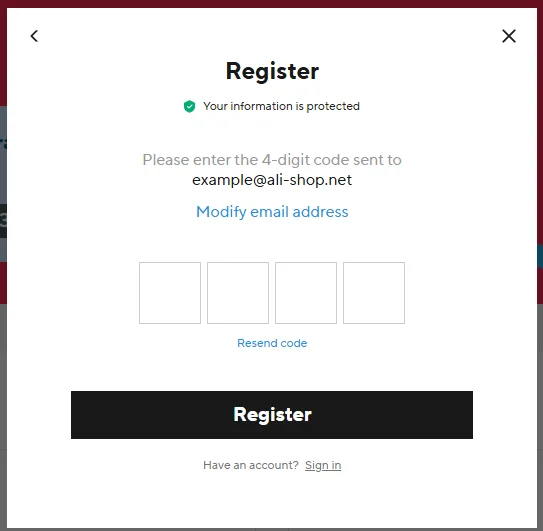
- Enter the code and complete registration. Enter the four-digit code from the email and click Register. If you entered the wrong email address, click Modify email address to correct it.
- Other sign-up methods. The initial form also offers sign-in options through a passkey, Facebook, or Twitter (X) below the Continue button. Click More options to view additional methods. Choose the one you prefer and follow the on-screen instructions.


How to Sign Up in the AliExpress App
- Install the AliExpress app from Google Play for Android or the App Store for iPhone.
- Open the Account section. Tap the Account tab in the bottom-right corner of the app. At the top of the screen, tap the black Sign in or register button.
- Choose your registration method. Enter your email address or phone number and tap Continue. You can also use a passkey or continue with Apple, Google, Facebook, or X.
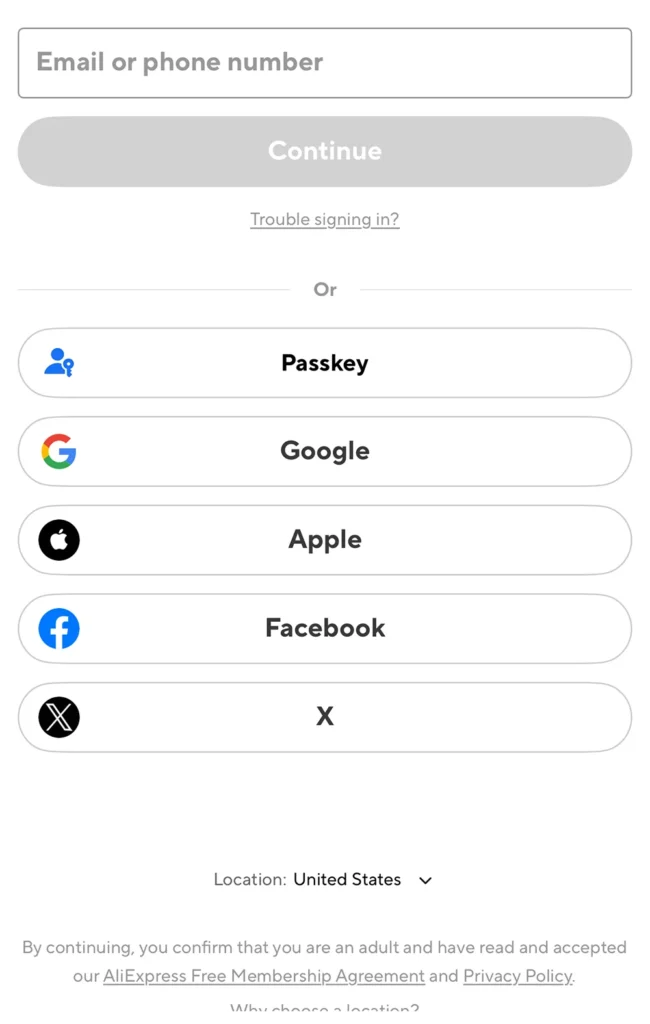
- Complete your registration. Follow the on-screen instructions. If you sign up with an email address, the process is essentially the same as on the website, including email verification.

If you already have an AliExpress account, you don’t need to register again. Simply sign in to the app using your existing account. Your order history, wish list, and other account information will be available both in the app and on the website.
Important Registration Details
- Password and contact details. In the email registration process described above, AliExpress asks you to verify your email address without requiring you to create a password during those steps. The verification email also states that you can change your password, email address, and phone number after verification.
- Terms and conditions. By proceeding with registration, you confirm that you’re an adult and accept the AliExpress Free Membership Agreement. The registration form also refers to the Privacy Policy and explains that your personal data may be used for marketing purposes, with an option to opt out.
- Account security. Never share your verification code with anyone. If you receive a registration confirmation email without signing up for AliExpress, don’t use the code and review the security of your email account.
Why You May Have Trouble Signing Up for AliExpress
AliExpress may prevent you from completing registration even if you’ve entered your details correctly. Possible reasons include verification problems, technical issues, or security restrictions.
Verification Code Not Arriving
If you still haven’t received the verification email after requesting another code, check whether your mailbox is full or your email filters are blocking the message. Some email providers may delay or reject emails from AliExpress. If the issue persists, try another email address, but first make sure an account wasn’t already created with the original one.
If you’re not receiving an SMS code, check your phone number, including the country code. Your mobile carrier may also be blocking international or automated messages.
AliExpress Won’t Accept the Verification Code
Make sure you’re using the code from the most recent email or SMS, as an earlier one may no longer be valid. If the latest code is also rejected, the issue may be on AliExpress’s side.
Some users have reported an Account system exception error after entering a valid four-digit code. If you encounter this error, try again later or contact AliExpress customer support. Repeatedly requesting new codes won’t necessarily resolve the problem.
Email Address or Phone Number Already in Use
If AliExpress says your email address or phone number is already in use, it may be linked to an existing account. Try signing in rather than registering again. If you can’t access your account, use the Trouble signing in? option to recover access.
Registration Form Not Working
If the Continue button doesn’t respond, the page freezes, or the next step won’t load, try a different browser or the AliExpress mobile app. Ad blockers and privacy extensions can sometimes interfere with website forms. If the problem continues, try clearing your AliExpress cookies and reopening the registration page.
AliExpress Rejects Your Email Address
The error Please enter a valid email address may appear even when your email address is correct. Check for typos first. If you’ve entered it correctly, try a different address or contact customer support. Only AliExpress can confirm why a particular address is being rejected.
New AliExpress Account Blocked
AliExpress may restrict access to an account immediately after registration. One possible reason is suspected use of multiple accounts. Under AliExpress’s rules, each user may register only one account unless the platform grants permission otherwise.
If you receive a notice that your account has been blocked, check whether you can submit an appeal. Avoid creating additional accounts to bypass the restriction, as this may lead to further problems. For details on possible reasons and how to appeal, see our guide: What “Suspected of Malicious Additional Accounts Creation” Means on AliExpress and How to Appeal.
If none of these steps work, contact AliExpress customer support. Save the exact error message or take a screenshot to help explain the issue.
What to Do After Creating Your AliExpress Account
Before placing your first order, it’s worth checking a few account settings to avoid problems with pricing, delivery, or discounts.
- Set your language and currency. Choose your preferred language and the currency used to display prices in your AliExpress settings. Keep in mind that the displayed currency may differ from the currency used for payment.
- Add your shipping address. Open your shipping address settings and enter the recipient’s full name, phone number, street address, city, and ZIP or postal code. Include the state or province and apartment or unit number where applicable. Double-check the details to avoid delivery issues. You can also add your address during checkout.
- Check discounts for new customers. AliExpress may offer special prices, coupons, and promo codes for your first order. Eligibility depends on your country, the product, and the promotion’s terms. Before paying, check that any applicable discount appears in your final order total. For current US offers, visit our promo code and coupon directory.
If you’re making your first purchase on AliExpress, see our step-by-step guide to placing an order.
Frequently Asked Questions
Can you order from AliExpress without an account?
No. You need an AliExpress account to place and pay for orders. Without registering, you can browse products, compare prices, and add items to your cart, but you can’t complete a purchase.
Can family members share one AliExpress account?
No. AliExpress prohibits sharing account access with anyone, including family members. Each person can have their own account, even if they live at the same address. However, AliExpress may restrict accounts if it suspects that one person is operating multiple profiles. The platform doesn’t disclose how it identifies linked accounts.
Will signing in with Google or Apple create a new account if you originally registered with email?
Not necessarily. AliExpress may recognize your existing account, but signing in through Google or Apple can sometimes create a separate one. If your previous orders are missing, sign out and try the method you originally used to register.
Can you merge two AliExpress accounts and their order histories?
No. AliExpress doesn’t offer a way to merge accounts or transfer orders between them. Each account has its own purchase history. If you accidentally created a second account, keep access to both, especially while you have pending orders, refunds, or disputes.