


To place orders on AliExpress, you need to create an account and sign in. Your orders, saved shipping addresses, and shipment tracking information are linked to that account. However, AliExpress uses the same form for registration and sign-in, while multiple sign-in methods and additional security checks can be confusing even for returning users.
This guide covers how to sign in to your AliExpress account, resolve common login issues, and regain access if you lose it.
- How to Sign In to Your AliExpress Account
- Sign In with Email or Phone Number
- Sign In with Google or Apple
- Sign In with a Passkey
- AliExpress Sign-In Problems and How to Fix Them
- AliExpress Won’t Accept Your Password or You Can’t Remember It
- Verification Code Doesn’t Arrive or Isn’t Accepted
- Can’t Sign In with Google, Apple, Other Services, or a Passkey
- CAPTCHA Not Working on AliExpress
- AliExpress Keeps Returning to the Sign-In Page or Asking You to Sign In Again
- You See a Different or Empty Account After Signing In
- How to Recover Access to Your AliExpress Account
- How to Find Your AliExpress Account If You’ve Forgotten Your Sign-In Details
- No Longer Have Access to Your Linked Email or Phone Number
- Your AliExpress Account Is Restricted or Blocked
How to Sign In to Your AliExpress Account
You can sign in on the official AliExpress.com website or through the mobile app. On the website, open the Account menu and choose Sign in. In the app, go to the Account tab.
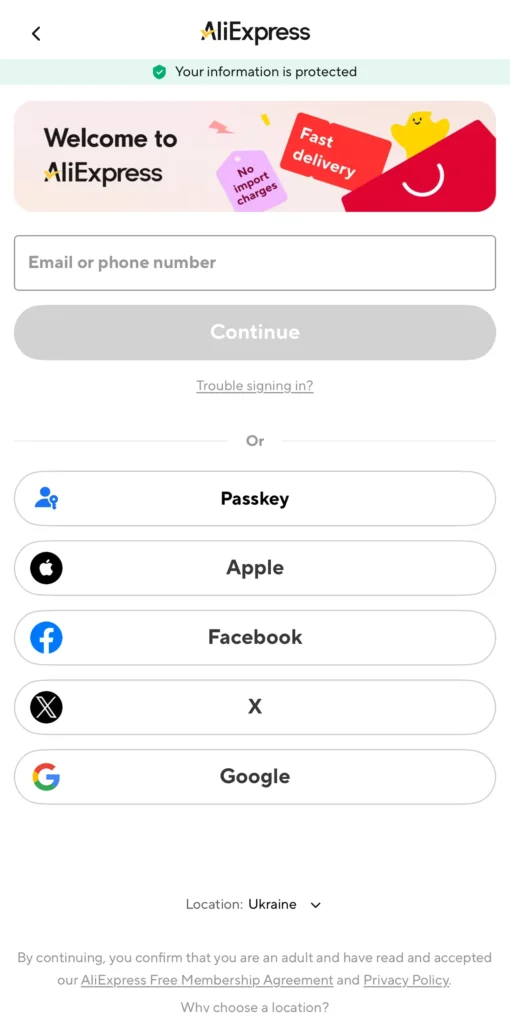

The available sign-in methods and the layout of the sign-in form may vary depending on your country, device, and interface version.
Sign In with Email or Phone Number
- Enter the email address or phone number associated with your account in the sign-in form.
- Select Continue if the button appears. Then enter your password or use a one-time code if AliExpress offers that option.
- Complete any additional identity verification requested by AliExpress.
If the form initially displays only other sign-in methods, look for the option to sign in with an email address or phone number. Phone number sign-in may not be available in every country or for every account.
Sign In with Google or Apple
If your AliExpress account is linked to Google or Apple, select the corresponding icon in the sign-in form and follow the prompts to complete sign-in. You won’t need to enter a separate AliExpress password when using this method.
Make sure you use the same Google or Apple account you previously linked to AliExpress. Otherwise, you may be signed in to a different profile or prompted to register.
Sign In with a Passkey
A passkey lets you sign in to AliExpress without entering a password. You need to have a passkey already set up for your account and be able to access it on your device or through a compatible passkey manager.
Select Passkey if this option appears in the sign-in form, then confirm your identity using your fingerprint, facial recognition, or device screen lock. Your browser or operating system may automatically offer a saved passkey.
If your passkey is stored on another device, you may be prompted to use that device to sign in. If you can’t use your passkey, choose another sign-in method already linked to the AliExpress account you want to access.
AliExpress Sign-In Problems and How to Fix Them
Start by identifying when the problem occurs, whether it’s while entering your password, receiving a verification code, completing a security check, or after signing in.
AliExpress Won’t Accept Your Password or You Can’t Remember It
If AliExpress rejects your password, check the following.
- Sign-in details. Make sure you’re using the correct email address or phone number. Check your keyboard layout, capitalization, Caps Lock, and any accidental spaces.
- Autofill. If your browser or password manager automatically fills in a saved password, try entering it manually. The saved password may be outdated.
- Previous sign-in method. If you previously used Google, Apple, or a passkey, try signing in the same way. Your Google or Apple password isn’t necessarily your AliExpress password.
If you’ve forgotten your password, you can reset it through AliExpress.
- Open the sign-in form and select Trouble signing in?
- Choose Reset your password. You can also go directly to the AliExpress password reset page.
- Select Email/Member ID or Phone number, enter the required information, and select Continue.
- Complete the security verification requested by AliExpress and follow the instructions to set a new password.
If you still can’t sign in after resetting your password, make sure you’re using the new password for the correct account and that autofill isn’t entering the old one. If AliExpress accepts your password but doesn’t complete the sign-in process, check any error message that appears. Resetting your password again may not resolve the underlying issue.
Verification Code Doesn’t Arrive or Isn’t Accepted
AliExpress may send a one-time code for signing in or additional identity verification. What to do next depends on whether you receive the code and what happens when you enter it.
- Verification email not received. Make sure AliExpress is sending the code to the correct email address. Check your Spam folder and other inbox categories, and try searching your mailbox for AliExpress. Receiving regular emails from AliExpress doesn’t necessarily mean the verification email was delivered.
- SMS code not received. Check your phone number and country code. Make sure your phone can receive text messages and isn’t blocking SMS messages from automated senders.
- Verification code rejected. Check that you’ve entered the digits correctly and that the code hasn’t expired. If you’ve requested several codes, use the most recently received one, as an earlier code may no longer be valid.
- Sign-in doesn’t complete after entering the code. Check whether AliExpress is requesting additional identity verification. If the sign-in form reappears without an explanation, the issue may be related to your sign-in session.
If AliExpress stops accepting requests for new codes or limits the number of attempts, avoid repeatedly requesting more codes. Try again later. The waiting period may vary, and AliExpress may not specify when the restriction will end. If another verification method is offered, you can use it instead.
Can’t Sign In with Google, Apple, Other Services, or a Passkey
When signing in through these services or using a passkey, the option you need may be missing, authentication may fail, or your passkey may be unavailable on your device.
- Google, Apple, and other services. Check whether you can access your account with the relevant service. If authentication succeeds but you’re not redirected back to AliExpress, check whether your browser is blocking pop-ups or redirects.
- Sign-in option missing. Available sign-in methods may differ between the website and mobile app. Check the options shown in your current sign-in form. A missing button doesn’t necessarily mean your AliExpress account has been blocked.
- Passkey not working. Check whether the correct passkey is available on your device or through your passkey manager. If it’s stored on another device, follow any prompts to sign in using that device.
Don’t delete your passkey until you’ve confirmed that another sign-in method works. Deleting a passkey doesn’t guarantee that the problem will be resolved.
CAPTCHA Not Working on AliExpress
AliExpress may require you to complete a CAPTCHA challenge during sign-in, including one that involves dragging a slider. If the challenge doesn’t load, doesn’t respond, or keeps appearing:
- Refresh the page, wait for the CAPTCHA to load completely, and try again.
- Check whether browser extensions, particularly script blockers, are interfering with the CAPTCHA. If necessary, temporarily disable them for AliExpress.
- If the challenge still doesn’t work, try another browser or the AliExpress mobile app.
Even after you successfully complete the CAPTCHA, AliExpress may ask for additional identity verification. This is a separate step in the sign-in process and doesn’t necessarily mean the CAPTCHA has failed again.
AliExpress Keeps Returning to the Sign-In Page or Asking You to Sign In Again
If AliExpress keeps returning you to the sign-in page, redirects you between pages, or asks you to sign in again shortly afterward, check your browser and the data it has stored for AliExpress.
- Try a private browsing window. If you can sign in there, stored website data or browser extensions may be causing the issue.
- Clear AliExpress site data. In your browser settings, delete cookies and other data stored for AliExpress, then try signing in again. This may end your existing AliExpress sessions, but you don’t need to clear your entire browsing history.
- Compare the website and mobile app. If the problem occurs only on one platform, try signing in through the other. This can help determine whether the issue is specific to your browser or app.
One specific issue is the 400 Bad Request error accompanied by the message Request Header Or Cookie Too Large. This indicates that the request headers exceed the server’s size limit. Clearing cookies for AliExpress may help, but not every 400 error has the same cause.
If AliExpress explicitly states that your account is restricted, the problem may involve an account access restriction rather than a browser issue.
You See a Different or Empty Account After Signing In
If you successfully sign in but see a profile without your usual order history or other saved information, it doesn’t necessarily mean your previous account has been deleted.
Check which sign-in method you used before and which account it was linked to. Some users have reported that signing in with an email address and password opened a different AliExpress account from signing in with Google using the same email address. Compare the details of the account you’re currently signed in to with those of the account you’re trying to access.
Don’t delete the account you’re currently signed in to or change any linked accounts or sign-in methods until you’ve worked out how to access your original account. If you can’t remember which contact details you used, try the account lookup feature described in the next section.
How to Recover Access to Your AliExpress Account
If you can’t use your usual sign-in methods, the next steps depend on whether you remember your account details, still have access to your linked email address or phone number, and whether AliExpress has restricted your account.
How to Find Your AliExpress Account If You’ve Forgotten Your Sign-In Details
If you can’t remember which email address or phone number you used on AliExpress, try finding your account using the information you still have.
- Open the sign-in form and select Trouble signing in?
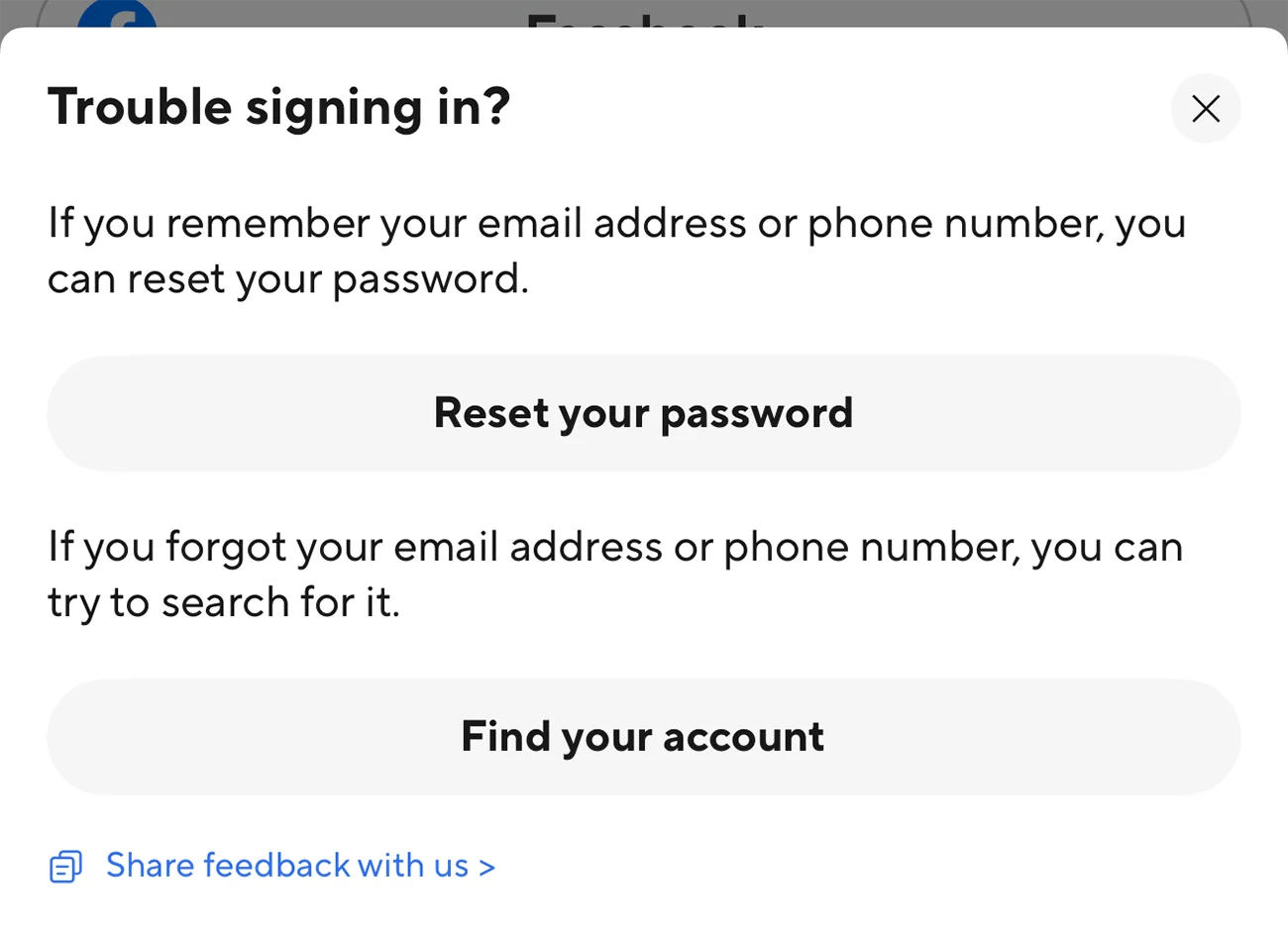
- Choose Find your account.
- Follow the on-screen instructions to search for your account using an email address or mobile phone number.

This feature helps you locate your account, not reset your password. If you can’t remember your email address, phone number, or any order details, you won’t be able to find your account through this form.
If you’re still signed in to the correct account on another device, check the contact details available there.
No Longer Have Access to Your Linked Email or Phone Number
If you remember your account details but can no longer receive emails or text messages at your linked email address or phone number, check which alternative verification methods AliExpress offers.
- Another linked email address or phone number. If this option appears during verification and you still have access to it, use it to confirm your identity.
- Verification using a paid order. AliExpress may allow you to verify your identity using an order paid for with a credit or debit card. Follow only the steps shown in the official verification form.
Having a linked phone number or a previous paid order doesn’t guarantee that the corresponding verification method will be available. If you can’t reset your password, the AliExpress password reset page includes a Can’t reset your password? link. Check the options provided there, and if none of them work for you, contact AliExpress support.
Your AliExpress Account Is Restricted or Blocked
An additional security check is not the same as an account suspension or block. What you should do depends on the message AliExpress displays.
- You’re asked to regain access. If AliExpress offers a Regain Access option, try completing the verification process. If the page doesn’t open or redirects you to customer support, save the error message or take a screenshot.
- Your account has been blocked or disabled. Check the message for the reason behind the restriction and any available option to appeal or regain access. If no such option is provided, contact customer support.
Not every request for identity verification means your account has been blocked. Resetting your password also won’t automatically remove restrictions placed on your account. If AliExpress doesn’t specify when or how a restriction can be lifted, don’t assume it will expire after a particular period.
How to Contact AliExpress Support. Visit the official AliExpress Help Center or email AE_customerservice@aliexpress.com. Include any account details you can provide, the sign-in method you used, the exact error message, and the troubleshooting steps you’ve already tried. Attach a screenshot if possible. If the Help Center requires you to sign in, try contacting support using the email address provided.
Never share your password, one-time verification codes, or full payment card details in messages or emails. If AliExpress asks you to verify your identity using payment information, enter it only through the official verification form.