The “We have detected unusual traffic from your network, please try again later” error can appear on AliExpress at the worst possible moment. A shopper opens a product page, goes to the cart, redeems coins, tries to claim a coupon, or proceeds to checkout, but instead sees a message about “unusual traffic”.
This is not a glitch on one specific page. Traffic verification works across the entire platform, so the error can appear in almost any section of AliExpress. The most frustrating part is that the notification does not explain what caused the restriction. The user is left wondering whether the trigger was the account, browser, internet connection, VPN, mobile carrier, ad blocker, or current session.
AliExpress used to show a similar message: “Sorry, we have detected unusual traffic from your network”. The newer version with the phrase “please try again later” indicates a temporary request limit, or Rate Limit, for a specific session, device, or IP address. In this situation, frequent page refreshes or repeated clicks only make the problem worse, because the system receives new suspicious requests and may extend the restriction period.
Below, we explain why this situation can occur even for regular shoppers and what you can do to regain access to AliExpress faster.
- What the error means
- Why AliExpress may consider your activity suspicious
- Main reasons why the error appears
- Too many pages open at the same time
- VPN, proxy, or an IP address with a poor reputation
- A shared IP address from a mobile carrier or ISP
- Ad blockers and strict privacy settings
- Repeated requests during sales, coupons, and coin-related actions
- A problematic session or outdated browser data
- Third-party extensions and automation tools
- How to fix the error on AliExpress
- Stop repeating the same actions
- Check whether the error page is stuck in an old tab
- Turn off VPN or proxy
- Change your network
- Disable ad blockers for AliExpress
- Clear AliExpress data in your browser
- Try another browser or the official app
- Contact support if the restriction does not go away
- Frequently Asked Questions
What the error means
The message “We have detected unusual traffic from your network, please try again later” means that AliExpress has detected unusual activity coming from your network and is asking you to try again later.
The key word in this notification is “network”. The marketplace is not saying that the problem is necessarily with the user’s account. The restriction is related to the current connection and the technical details of the session: the IP address, user session, device, browser, or the way the device is connected to the internet.
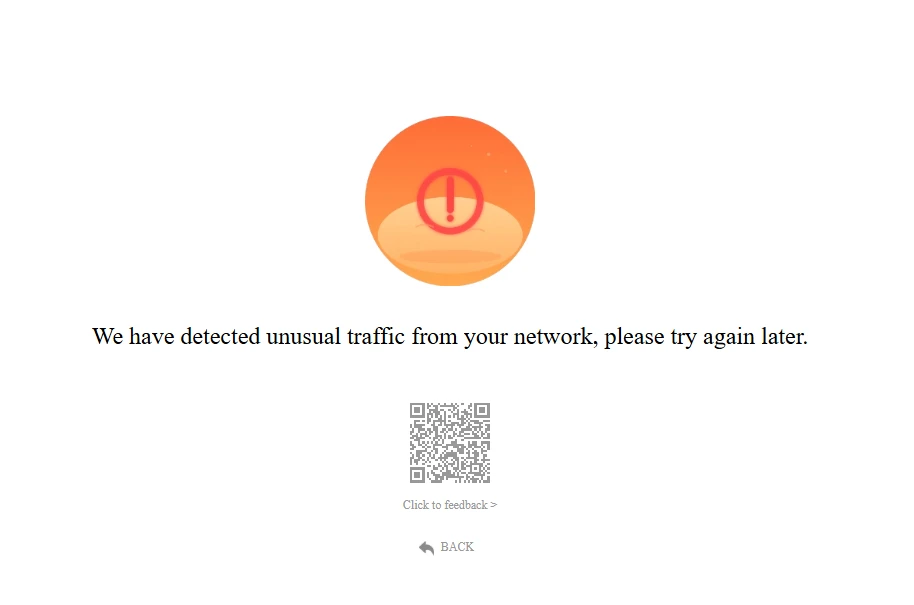
The phrase “unusual traffic” means that activity from your connection looks atypical to AliExpress security algorithms. The platform does not just record that you opened the website. It also analyzes technical request parameters, including frequency, speed, and repetition.
The added phrase “please try again later” points to a temporary request limit. In practice, this appears as an interstitial error page between the user and the action they are trying to complete. A person may try to open a product page, go to the cart, access coins, or proceed to checkout, but instead of moving to the next step, they keep seeing the same error message.
This restriction acts as a temporary barrier for the current session, device, or IP address. AliExpress is not simply showing a warning. For a certain period of time, it stops processing requests associated with suspicious activity. That is why the user cannot continue shopping normally until the restriction expires or the trigger is removed.
In other words, this error does not automatically mean that the account has been blocked. It means that the AliExpress security system has temporarily limited certain actions.
Why AliExpress may consider your activity suspicious
AliExpress is not judging the shopper’s intent. It is evaluating the technical pattern of their actions. For the user, this may simply be browsing products or trying to continue a purchase, but the security system sees the sequence of requests, the speed of actions, repeated page transitions, and the overall session context.
This is why regular shoppers can sometimes be subject to a restriction. If behavior on the platform matches patterns typically associated with automated tools, the marketplace responds with a protective restriction. The system does not determine whether the user actually had malicious intent. It works based on technical risk signals.
That is why the error may appear even when the shopper has not violated any rules and has not tried to bypass protection. Below, we look at the specific situations that most often trigger this AliExpress response.
Main reasons why the error appears
The “We have detected unusual traffic from your network, please try again later” error usually does not have one universal cause. It appears when AliExpress detects signs of risky activity in the user’s actions or connection. In most cases, one of several triggers is involved.
Too many pages open at the same time
One common situation is actively comparing products across multiple tabs. A shopper opens different versions of the same item, checks reviews, delivery options, coupons, specifications, and prices. For a person, this is a natural way to choose a product.
For AliExpress, this behavior can look different. Each open page separately loads photos, reviews, recommendations, delivery options, seller information, and other data. If many tabs are open at once, the system sees a sharp increase in requests from the same connection. This can resemble automated data scraping.
VPN, proxy, or an IP address with a poor reputation
VPNs and proxies often trigger the error because of IP address reputation. The same VPN address may be used by hundreds of people, including not only real users but also automated services, scripts, or multiple accounts.
In this case, AliExpress evaluates not only your account but also the address from which the requests are coming. If the IP address has already been associated with suspicious activity, the system may show the error page even to a user who is simply browsing products.
This happens especially often with free VPNs, public proxies, and server IP addresses that do not look like a typical home or mobile connection.
A shared IP address from a mobile carrier or ISP
The error can also appear without a VPN. Mobile carriers and some internet service providers, or ISPs, use shared external IP addresses for many customers. Because of this, several different users may look to AliExpress like activity coming from the same network.
If too many requests come from such an IP pool, or if some users behave suspiciously, the restriction may affect other shoppers as well. This is why the error sometimes disappears after switching from mobile internet to Wi-Fi, or vice versa.
Ad blockers and strict privacy settings
AdBlock, uBlock Origin, AdGuard, Privacy Badger, Brave Shield, and other protection tools can interfere with AliExpress essential scripts. The problem is not ad blocking itself, but the fact that some parts of the user verification process may be blocked together with advertising elements.
As a result, the slider or another verification element may fail to load. The user sees only the “unusual traffic” message and has no way to confirm that they are not a robot. For the system, this incomplete verification looks like an additional risk.
Repeated requests during sales, coupons, and coin-related actions
The error often appears during actions where users repeatedly click the same buttons. This includes exchanging coins, claiming coupons and promo codes, participating in sales, or trying to check out with a limited discount.
If the page freezes, a coupon does not apply, or an action fails on the first attempt, the shopper may start clicking again and again. For AliExpress, such a series of identical requests can look like a clicker or a fast-buying script. As a result, the system restricts further actions through its security mechanisms.
A problematic session or outdated browser data
Sometimes the trigger is not the network or the user’s behavior, but the browser session itself. This can happen after logging in through a VPN, changing networks, staying logged in for a long time, changing the shipping country, or when cookies are saved incorrectly.
In this situation, AliExpress may detect conflicting technical data. For example, the account is logged in, but some background parameters of the session no longer match the current connection. This can trigger protection and lead to the error page.
Third-party extensions and automation tools
Another possible cause is tools that do not just change the appearance of the page but actively interact with AliExpress. These may include extensions for bulk product imports, price monitoring, automatic data collection, dropshipping, or coupon searching.
Such services can send additional requests in the background. The user does not always see this activity, but the marketplace detects it. If an extension works too aggressively, the platform may interpret it as automated behavior and restrict access.
How to fix the error on AliExpress
If AliExpress shows “We have detected unusual traffic from your network, please try again later”, you should not immediately clear your browser data, create a new account, or refresh the page repeatedly. Start by removing the factors that most often trigger the request-limiting system and check whether the restriction is still active.
Stop repeating the same actions
After a page with the error message appears, do not keep refreshing it, reopening the cart, or clicking the same button over and over again. Each new attempt creates another request, which the security system may again interpret as suspicious activity.
It is better to pause for 10-30 minutes. If the error was caused by a short spike in activity, this may be enough for the restriction to clear.
Check whether the error page is stuck in an old tab
Sometimes AliExpress redirects the user to a separate page after suspicious activity is detected. Even if the restriction has already been lifted, the old error-page URL may not redirect you back to the product page, cart, coins section, or checkout page. The user keeps refreshing the same error page and assumes the block is still active.
To check this, open AliExpress in a new tab and go to the homepage or another section of the site. If the page opens normally, you can close the old tab with the error and continue shopping from the new page.
This step is worth trying before clearing cookies, switching browsers, or contacting support. In some cases, the problem is not the account or the network, but the old tab that continues to display the error page.
Turn off VPN or proxy
If you are using a VPN, proxy, or browser-based VPN extension, turn it off. Then close the browser and open the marketplace again using a direct connection.
Do not quickly switch between different VPN servers. To the security system, this may look even more suspicious because the account starts working from different IP addresses and countries within a short period of time.
Change your network
If the error does not disappear, try changing your connection. Switch from home Wi-Fi to mobile data, or vice versa. This helps in cases where the restriction is tied to the current IP address.
On a smartphone, you can briefly turn on Airplane Mode and then turn it off again. After reconnecting, your mobile carrier may assign a different IP address, and AliExpress may stop showing the error.
Disable ad blockers for AliExpress
If the verification slider does not appear under the error message, or the page looks incomplete, the problem may be caused by browser extensions. Temporarily disable AdBlock, uBlock Origin, AdGuard, Privacy Badger, Brave Shield, or other tools that block ads and trackers.
It is better to add AliExpress to the extension’s allowlist instead of disabling the blocker entirely. After that, refresh the page once and check whether you can pass the verification or continue to the next step.
Clear AliExpress data in your browser
If the problem is related to a corrupted session, a targeted cleanup of site data may help. You do not need to delete your entire browser history. It is enough to clear cookies and data related to AliExpress.
In your browser settings, find the section for cookies and site data, search for “aliexpress”, and delete the matching entries. If related domains such as “alicdn.com” or “alibaba.com” appear in the list, you can clear those as well. After that, restart the browser and sign in to your account again.
Try another browser or the official app
If the error appears only in one browser, open AliExpress in another one. For example, if the problem occurs in Chrome, check the site in Edge, Firefox, or Safari.
Another option is the official AliExpress mobile app. It uses a different authorization and device verification mechanism, so the app may work even when the web version shows the error page.
Contact support if the restriction does not go away
If the error keeps appearing for several days, shows up on different devices, and appears across different networks, it is worth contacting AliExpress support. When speaking to a live support agent rather than the EVA chatbot, provide the exact error text, where it appears, whether you used a VPN, which networks you have already tried, and what steps you have taken to fix the issue.
This will help distinguish a temporary network restriction from a problem with the account or a specific order.
If the error appeared after attempts to bypass AliExpress rules using bots, scripts, multiple accounts, suspicious proxies, or coupon and promotion abuse, it may lead to account restrictions. Do not use these methods to bypass the platform’s security system.
Frequently Asked Questions
Does this error mean my account is blocked?
No. The “We have detected unusual traffic from your network, please try again later” error does not automatically mean that your account has been banned. In most cases, it is a temporary restriction tied to the session, IP address, device, or connection.
When should I contact AliExpress support?
If the error keeps appearing for several days, shows up on different devices, and occurs across different networks, it is worth contacting support. In your message, include the error text, where it appears, whether you used a VPN, and what troubleshooting steps you have already taken.
Can I bypass the error with proxies, bots, or a new account?
No. Using bots, scripts, multiple accounts, suspicious proxies, or other methods to circumvent AliExpress rules may lead not just to a temporary error page, but to account restrictions.
What should I do if the error appears only in the browser, but the official mobile app works?
In that case, the issue is most likely related to the browser, cookies, extensions, or the current session. You can temporarily use the official mobile app, then clear AliExpress site data in the browser and check your ad blockers.
If the error still does not go away after these steps, or if you have questions about your specific situation, leave a comment under this post. We will suggest what you can try in your case.