Your shipping address on AliExpress specifies where your order should be delivered and who the recipient is. Mistakes in the address or problems saving it can complicate delivery, especially once the order has shipped. It’s important to enter the correct details and check that AliExpress has saved them accurately.
This article explains how to add, fill out, and change a shipping address on the AliExpress website and mobile app. It also covers common shipping address issues and how to resolve them.
- Where to Find and Add a Shipping Address on AliExpress
- How to Add a Shipping Address on the AliExpress Website
- How to Add a Shipping Address in the AliExpress App
- How to Fill Out Your Shipping Address on AliExpress
- Recipient’s Name and Phone Number
- Country, State, City, and Postal Code
- Street Address, House Number, and Apartment
- How to Edit or Delete a Saved Shipping Address on AliExpress
- How to Edit or Delete a Shipping Address
- How to Set a Default Shipping Address
- How to Change Your Shipping Address After Placing an Order on AliExpress
- If Your Order Hasn’t Shipped Yet
- If Your Order Has Already Shipped
- If Your Order Was Shipped to the Wrong Address
- Why AliExpress Won’t Accept Your Address or Save It Correctly
- Unable to Select a City or Region
- AliExpress Won’t Save Your Shipping Address
- AliExpress Displays or Changes Your Address Incorrectly
- Frequently Asked Questions
Where to Find and Add a Shipping Address on AliExpress
You can add a shipping address on AliExpress through your account settings or directly during checkout. Once saved, the address will be available for future purchases, so you won’t need to enter it every time.
How to Add a Shipping Address on the AliExpress Website
- Sign up or sign in to your account on AliExpress and open the Account section.
- Go to Settings and select Shipping Address. You can also use the direct link to the address management page.
- Click Add a New Address. Enter the recipient’s contact details and shipping address. If AliExpress offers address suggestions, you can select the correct address from the list or enter it manually if that option is available.
- Review the information and click Confirm to save the address.
How to Add a Shipping Address in the AliExpress App
Open the AliExpress app and go to the Account section at the bottom of the screen. Tap the gear icon to open Settings, then select Shipping Address.
On the saved addresses page, tap Add New Address, fill in the required fields, and save your changes.
Important: Don’t confuse your shipping address with the Ship to setting. Ship to determines which country or region AliExpress uses to show available products and shipping options. On the website, this setting appears at the top of the page next to the country flag. Your shipping address contains the recipient’s details used to deliver the order.
How to Fill Out Your Shipping Address on AliExpress
The language and format of your shipping address depend on the destination country. If AliExpress provides a list of states, regions, or cities, select the correct location from the available options. When entering an address using Latin characters, transliterate place names rather than translating their meanings. Follow the address format supported by AliExpress for your destination country.
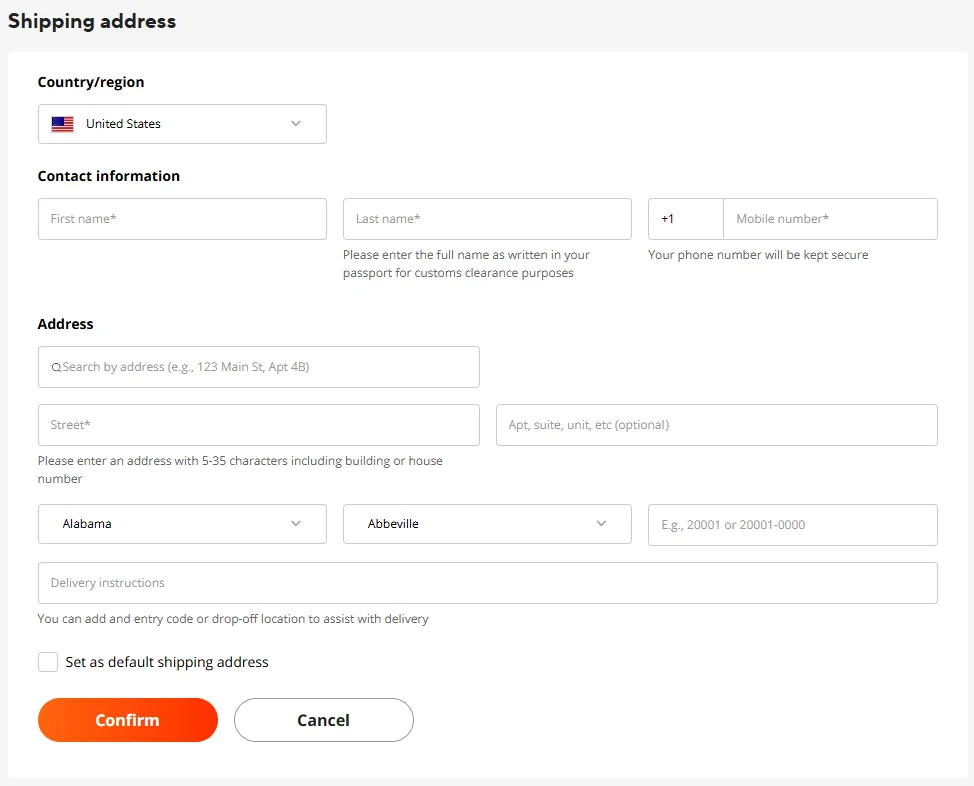
You can search for your address using a postal code, street name, or full address. If AliExpress doesn’t suggest the correct address, click Enter Manually to open separate fields for entering your address details.
Recipient’s Name and Phone Number
Enter the recipient’s full name in the First Name and Last Name fields. Use the recipient’s legal name, as accurate identification details may be required for customs clearance.
Enter a mobile phone number with the correct international country code. For example, the country code for the United States is +1. If the code is already selected in a separate field, don’t enter it again. Use a valid phone number where the carrier can reach the recipient if necessary.
Country, State, City, and Postal Code
Select the country where you want your order delivered. When entering the address manually, choose the appropriate state, province, or region, followed by the city or town. The available fields and administrative divisions may vary by country.
In the ZIP Code or Postal Code field, enter the code that matches your delivery address. If you’re unsure of the correct code, check the official website of the postal service in the destination country. A mismatch between the postal code and city can cause delivery problems.
Street Address, House Number, and Apartment
In the Street Address field, enter the house number and street name in the format used in the destination country. The optional Apt, Suite, Unit, etc. field is for additional details, such as an apartment, suite, or unit number.
For example, if your address is 123 Maple Street, Apt 8, enter 123 Maple Street in the first field and Apt 8 in the second. If no additional details are needed, leave the optional field blank.
Once you’ve completed the form, select Set as Default Shipping Address if you want to use this address for future orders, then click Confirm. Check that all details have been saved correctly, especially if AliExpress automatically filled in the city, region, or other information.
How to Edit or Delete a Saved Shipping Address on AliExpress
On AliExpress, you can edit saved shipping addresses, delete ones you no longer need, and choose a default address for future orders. All these options are available in the Shipping Address section of your account.
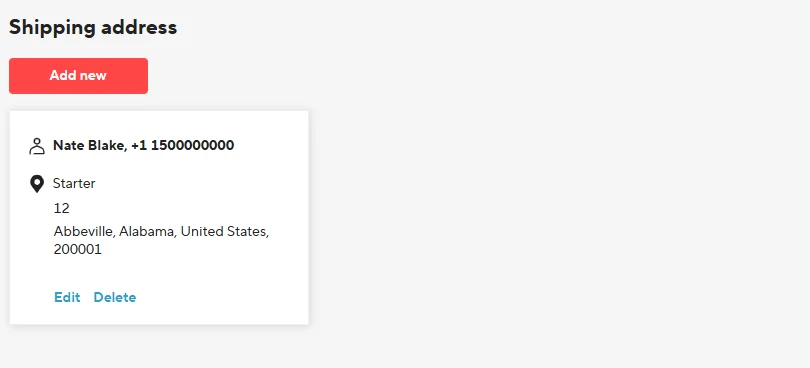
How to Edit or Delete a Shipping Address
To change an address, open your list of saved addresses and click Edit next to the one you want to update. Make the necessary changes and save them. Check the address afterward, especially if you changed the city, region, or postal code.
If you no longer use an address, click Delete next to it and confirm the deletion. This helps prevent you from accidentally selecting an outdated address when placing future orders.
How to Set a Default Shipping Address
If you have multiple saved addresses, you can set one as your default. Open the address you want to use, select Set as Default Shipping Address, and save your changes.
Your default address will automatically be suggested when you place a new order, but you can choose another saved address at checkout.
Important: Editing or deleting an address in your account does not change the shipping address of an order you’ve already placed. If you notice a mistake after placing an order, check whether you can correct it directly in the order details.
How to Change Your Shipping Address After Placing an Order on AliExpress
If you notice a mistake in your shipping address after placing an order, your options for correcting it depend on the order’s current status.
If Your Order Hasn’t Shipped Yet
Go to My Orders, select the relevant order, and open its details. If the Change Address or Edit Address button is available, click it, correct the necessary details, and save your changes. Keep in mind that some address fields may not be editable, and the editing option may disappear even before the order ships.
If the button is missing or the fields you need to change cannot be edited, contact the seller through AliExpress messages and ask them to correct the address. However, sellers cannot always modify shipping details for an order that has already been placed. Ask the seller to confirm whether the correct address will be used for shipping.
If the address cannot be corrected, check whether you can cancel the order and place a new one with the correct details. Before canceling, remember that any promo codes, discounts, or bonuses used for the original purchase may no longer be available when you reorder. Whether you can cancel a paid order also depends on its status and AliExpress’s current policies.
If Your Order Has Already Shipped
Once an order has shipped, you generally cannot change its shipping address through AliExpress. Check the tracking number and carrier information in your order details. Keep in mind that a shipping label or tracking number may be created before the package is physically handed over to the carrier. If the shipment is still being prepared, contact the seller immediately, although there is no guarantee that changes can still be made.
For shipped orders, AliExpress may display a notice indicating that the shipping address cannot be changed at the current stage of the order.
If the package is already in transit, contact the carrier to ask whether the address can be corrected or the shipment redirected. This depends on the country, carrier, and stage of delivery. Some carriers allow you to change the delivery address or pickup location, while others do not offer redirection for international shipments.
If Your Order Was Shipped to the Wrong Address
Check the shipping address in your order details and compare it with the shipment information, if the carrier makes that information available. What you should do next depends on where the mistake occurred:
- Buyer error. If you entered the wrong address at checkout, contact the carrier to find out whether the details can be corrected. If the package cannot be delivered, a refund is not guaranteed because the order may have been shipped to the address you provided.
- Address mismatch. If the address used for shipping does not match the address in your order, contact the seller and AliExpress customer support. Keep a record of the correct address shown in your order, the tracking number, and any available carrier information confirming the discrepancy.
If the package cannot be delivered because of an incorrect address, check its status with the carrier. If necessary, contact AliExpress customer support or use the available refund process. The outcome will depend on the cause of the error, the evidence provided, and the applicable buyer protection policies.
Why AliExpress Won’t Accept Your Address or Save It Correctly
When adding or editing a shipping address on AliExpress, you may encounter problems: your city or town may not appear in the list, the system may refuse to save your details, or it may display incorrect information after you confirm the address. These issues may be caused by incorrect address details or technical problems with the form.
Unable to Select a City or Region
Sometimes the city or town you need is missing from the AliExpress list, the selected city isn’t saved, or AliExpress automatically switches back to the previous city. Buyers have reported similar issues.
First, check that you’ve selected the correct country and state, province, or region, as these determine which locations appear in the list. Try searching for your address using the postal code or street name. If that doesn’t work, switch to manual address entry. Keep in mind that even in manual mode, the city and region fields may still require you to select an option from a dropdown list.
If your city is missing or AliExpress won’t accept your selection, don’t substitute another city or town. A location missing from the list doesn’t necessarily mean delivery to that area is unavailable.
AliExpress Won’t Save Your Shipping Address
If your address isn’t saved after clicking Confirm, check that all required fields are filled in and look for any error messages. Sometimes the system asks you to enter information you’ve already provided, such as your city or town.
If you used the automatic address lookup, try entering the address manually. You can also try saving it through a different AliExpress interface, such as the website or mobile app. This may help if the issue is specific to one version of the address form, but it isn’t a guaranteed fix.
AliExpress Displays or Changes Your Address Incorrectly
Some buyers have reported that their city changed, certain details disappeared, or extra information was added after saving an address. Problems can also occur when a browser’s autofill feature places information in the wrong fields.
If your address is displayed incorrectly, open it for editing and review the entered details. If you used your browser’s autofill feature, try entering the information yourself. If the problem occurs after selecting an address from AliExpress suggestions, check whether manual entry produces the correct result.
After saving, make sure all your address details remain correct. If the problem persists, contact AliExpress customer support, include a screenshot of the error, and describe the steps you took before it occurred.
Frequently Asked Questions
Can I Have an AliExpress Order Delivered to Someone Else?
Yes, you can place an AliExpress order for someone else. The recipient’s shipping address and contact details can be different from those of the person paying for the order.
Can I Have My AliExpress Order Delivered to a Post Office, Parcel Locker, or PO Box?
It depends on the destination country and shipping method. If AliExpress offers a pickup option (Self-Pickup), you can select an available post office, parcel locker, or pickup point at checkout. In some cases, the local carrier may allow you to choose a pickup location after the package has shipped.
Why Does AliExpress Say a Product Can’t Be Shipped to My Address?
The message “This product can’t be shipped to your address” doesn’t necessarily mean your address is incorrect. Check the country selected in the Ship to setting and the shipping address chosen for your order. If both are correct, the issue may be caused by shipping restrictions for the specific product or seller.